1. I check what the $0 actually covers
Jcode is released under the MIT license. That license covers the Jcode codebase; I check a downloaded model’s own license separately. Official Jcode license.
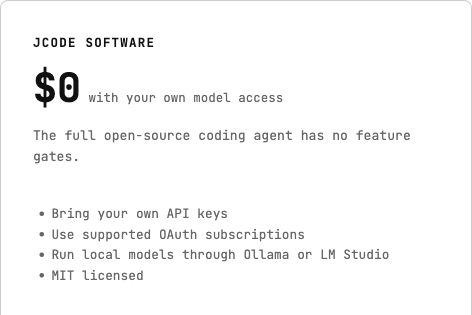
I can start with the provider comparison and setup guides. My first decision is where the model will run: on my computer, through my provider account, or through Jcode’s optional hosted service.
2. I read the hosted plan as a subscription plus usage
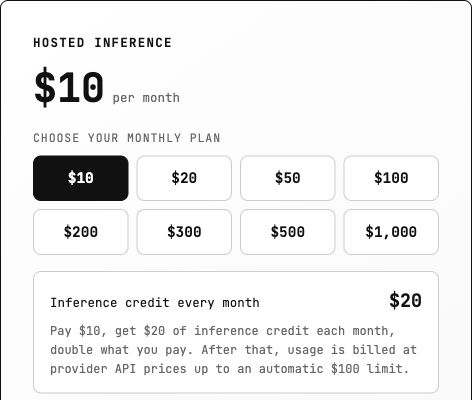
| Hosted term checked today | Current amount or rule |
|---|---|
| Monthly plan choices | $10, $20, $50, $100, $200, $300, $500 or $1,000 |
| Included inference credit | Twice the successful monthly payment; unused credit does not accumulate |
| After that credit | Provider API prices, added to the subscription |
| Automatic additional usage limit | 10× the plan price per UTC month; adjustable in the account |
| Remote Rust trial | First month of the $20 plan free; card required; renews at $20/month unless canceled |
Source: Jcode’s live pricing and billing terms, checked 13 October 2026.
I do not treat $10 as an all-in spending cap. For example, a $10 subscription plus $6 of billable usage after the credit produces a $16 subtotal, before any applicable taxes or other charges. The default $100 additional usage limit is separate from that subscription. This is an illustration, not a charge I incurred.
3. I match the bill to the provider I connect
The account I connect matters as much as the model name. I use this table to find the right billing rules before following a setup guide.
| Route | What I check before calling it free | Official source |
|---|---|---|
| OpenAI | ChatGPT and the API have separate billing. I do not assume my ChatGPT payment supplies API credit. | OpenAI billing |
| Claude | Subscription and Console API billing are distinct. Some plans currently include API credits, so I check my specific allowance instead of assuming unlimited API use. | Claude billing |
| Gemini | The developer API has a free tier for eligible models and usage, plus paid tiers. I do not transfer those quotas to a different OAuth or Code Assist route. | Gemini API pricing |
| GitHub Copilot | Free has limited AI Credits and automatic model selection. I check account eligibility and Jcode access before relying on it; a free Copilot account is not proof that every model will work. | Copilot plans |
| OpenRouter | The Free plan lists free models and 50 requests/day. Paid model usage and the Standard plan’s 5.5% platform fee are a different route. | OpenRouter pricing |
| Ollama | Local model use is available on the free plan. Cloud access has its own credits and paid options. | Ollama pricing |
| LM Studio | Local LLM use is listed as free; optional cloud services are separately priced. | LM Studio pricing |
These are billing distinctions, not a claim that I tested every provider’s free account. For configuration, I use the Jcode provider hub, the OpenRouter guide, or the Ollama guide.
How I would start with the smallest commitment
If I already have suitable hardware: I would try a local model first. There is no remote inference invoice for a request that stays local, but I still account for memory, disk space, electricity and time. I would start with a small code explanation before expecting a local model to handle a large repository.
If I need a hosted model: I would identify the exact account and model, inspect available credit, and check the spending control. I would distinguish a hard stop from an alert, inspect automatic top-ups, then try one short request and look for it in the provider’s usage record.
If I already pay for an AI subscription: I would check whether Jcode supports that account’s login route and what its allowance covers. I would not add an API key and assume the subscription pays that separate bill.
Questions I would settle before starting
Does free and open source mean every model is free?
No. I treat the agent’s license, model access and model license as three separate checks. Choosing a more expensive model does not change Jcode’s software license.
Do I need the Jcode hosted subscription?
No. The official pricing page also permits my own provider credentials, supported OAuth access and local models. I choose hosting only if its service fits my needs.
What would I write in my budget?
I would record: “Jcode software: $0; model route: ___; recurring payment: ___; included allowance: ___; extra-usage cap: ___.” Filling those blanks tells me more than the word “free” alone.
Research note: I captured the official pricing cards in a real browser. The screenshot pixels are preserved; arrows sit in a separate margin. Prices and plan rules above reflect 13 October 2026 and may change.