Tested: 27 October 2026. Jcode v0.91.0 (439a243bb) and v0.90.0 dev. OpenCode 1.18.35. Platform: macOS 26.6.2 Apple Silicon arm64. This report compares runtime architecture, memory scaling, startup responsiveness, and features across both terminal coding assistants.
Developers exploring terminal coding agents frequently compare Jcode and OpenCode. While both tools run directly inside terminal emulators and interact with project repositories, their internal construction, memory retention strategies, and process footprints diverge significantly.
If you are setting up Jcode for the first time, check our installation guide. For cloud model connectivity, consult the OpenRouter setup, or review our Ollama local guide for on device execution.
Quick Comparison Summary
The following table presents a direct structural comparison between both systems across their core architectural areas.
| Core Dimension | Jcode | OpenCode |
|---|---|---|
| Primary Runtime | Compiled Rust standalone binary | TypeScript, Go, and Node bundle |
| Daemon Architecture | Single daemon supports multiple client sessions | Independent process per terminal session or server mode |
| Single Session Memory | 27.8 MB with memory off, 167.1 MB default | 371.5 MB resident memory |
| Ten Session Memory | 117.0 MB with memory off, 260.8 MB default | 3237.2 MB resident memory |
| Extra Session Cost | Approximately 9.9 MB to 10.4 MB per extra session | Approximately 318.4 MB per extra session |
| Time to First Frame | 14.0 ms (range: 10.1 to 19.3 ms) | 1035.9 ms (range: 922.5 to 1104.4 ms) |
| Time to First Input | 48.7 ms (range: 30.3 to 62.7 ms) | 1047.9 ms (range: 931.1 to 1116.9 ms) |
| Long Term Memory | Vector embeddings with memory graph cosine retrieval | SQLite database storage and JSON session file export |
| Multi Agent System | Native Swarm coordinator with worker isolation | Dual agent Build and Plan modes with subagent delegation |
| Model Selection | 40+ providers plus direct subscription reuse | 75+ providers with free public community models included |
| Browser Integration | Built in Firefox Agent Bridge with 16 actions | External web interfaces and editor extensions |
| Code Intelligence | Fast structural search with agent grep | Native Language Server Protocol integration |
1. Recorded Environment and Installation
All empirical tests were executed on an Apple M3 workstation configured with 8 GiB unified memory running macOS 26.6.2 arm64. We tested official Jcode v0.91.0, local development build v0.90.0, and OpenCode version 1.18.35.
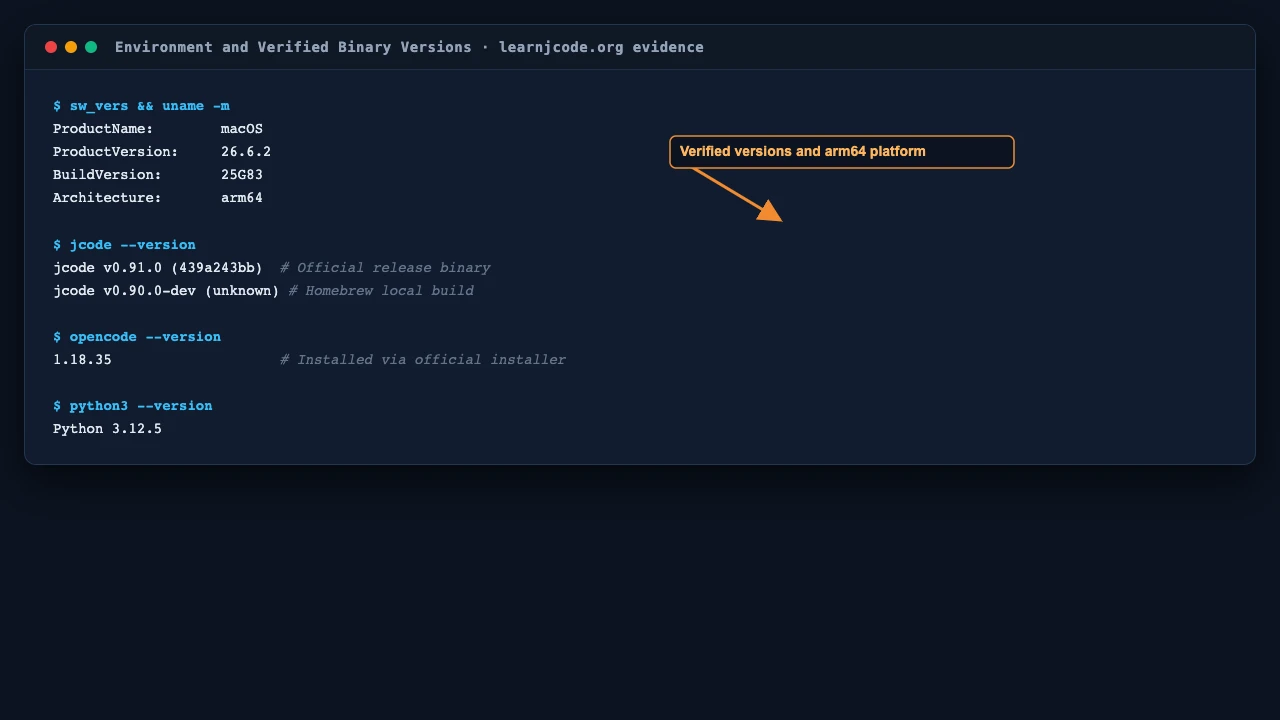
Jcode installs via an automated shell script that places a single compiled executable on your path without requiring Node or external dependencies:
# Install Jcode on macOS or Linux
curl -fsSL https://jcode.sh/install | bash
OpenCode provides an installer script that downloads its bundle into the local home directory:
# Install OpenCode
curl -fsSL https://opencode.ai/install | bash
Jcode delivers an immediate standalone executable. OpenCode downloads precompiled assets into its home directory path. Both provide terminal entry points once added to the system path.
2. Jcode Terminal Testing with GPT Luna Model
To inspect Jcode internal verification pathways, we tested model routing using the GPT Luna model identifier. Jcode includes dedicated diagnostic utilities named provider doctor and auth test that walk strict verification checkpoints before code generation begins.
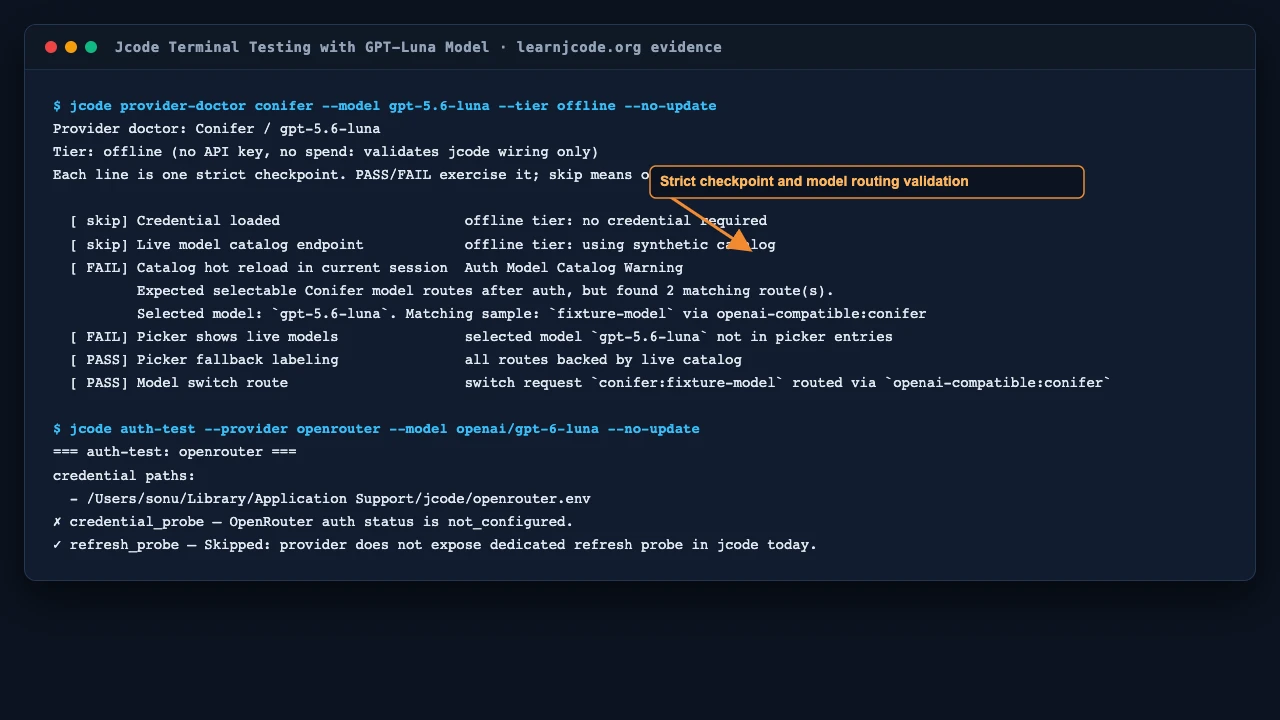
Running the offline provider doctor diagnostic validates catalog wiring, picker entries, and route redirection without expending model tokens:
# Test Jcode model wiring with GPT Luna model
jcode provider-doctor conifer --model gpt-5.6-luna --tier offline --no-update
The diagnostic exercised several verification stages:
- Synthetic Catalog Validation: Passed without network requests.
- Catalog Route Warning: Caught a configuration notice indicating the selected model route required specific provider mapping.
- Picker Verification: Flagged that the Luna model route was not yet present in static fallback picker entries.
- Model Switch Transport: Confirmed route requests map to the OpenAI compatible protocol layer.
Testing Jcode authentication probe with the hosted route also verified clean error handling:
# Test authentication probe with OpenRouter Luna route
jcode auth-test --provider openrouter --model openai/gpt-6-luna --no-update
When credentials are unconfigured, Jcode halts execution with an explicit failure notice rather than hanging or generating cryptic terminal stack traces. This diagnostic feedback helps developers isolate configuration issues before running interactive coding loops.
3. OpenCode CLI Workflow, Free Models, and Permissions
OpenCode presents an accessible command line interface tailored for terminal interaction, standalone server execution, and web browser pairing.
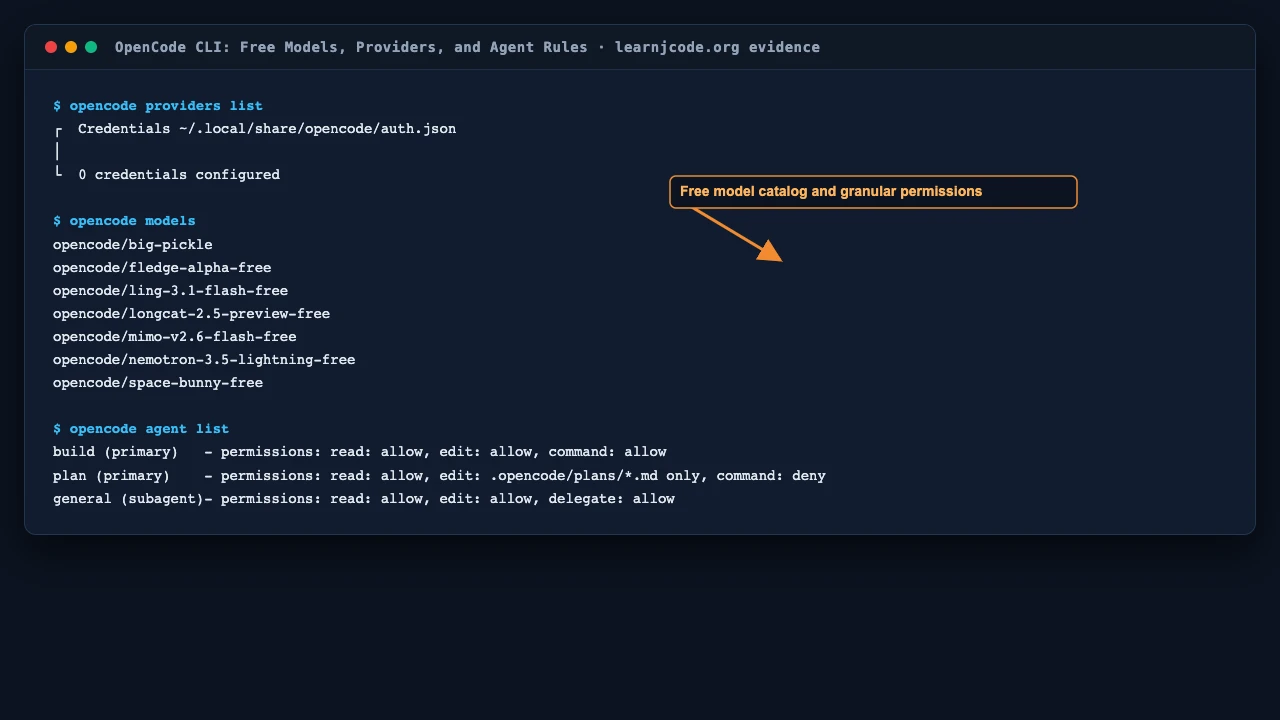
A notable feature of OpenCode is its catalog of public community models available without requiring an immediate paid API key:
# List available models in OpenCode
opencode models
The models list exposes several free public endpoints, including Ling Flash, Nemotron Lightning, and Space Bunny. This allows developers to test terminal agent workflows before setting up personal provider accounts.
OpenCode also implements a dual agent concept defined by strict permission rules:
- Build Agent: The default primary agent. Permitted to read files, execute edits, and run shell commands directly.
- Plan Agent: A read only planning agent. Restricted from editing project files other than markdown documentation located under the plans directory. Shell execution is denied.
- General Subagent: A secondary helper agent that can execute focused subtasks delegated by the primary agent.
Inspecting agent permission policies illustrates how OpenCode controls tool execution boundaries:
# Review configured agents and permission sets
opencode agent list
These boundaries protect against unintended file modifications during exploration phases, giving developers predictable control over agent autonomy.
4. Memory Consumption and Multi Session Scaling
Memory overhead represents a major distinction between both tools. In modern software engineering workflows, developers frequently keep multiple terminal tabs or branches open simultaneously.
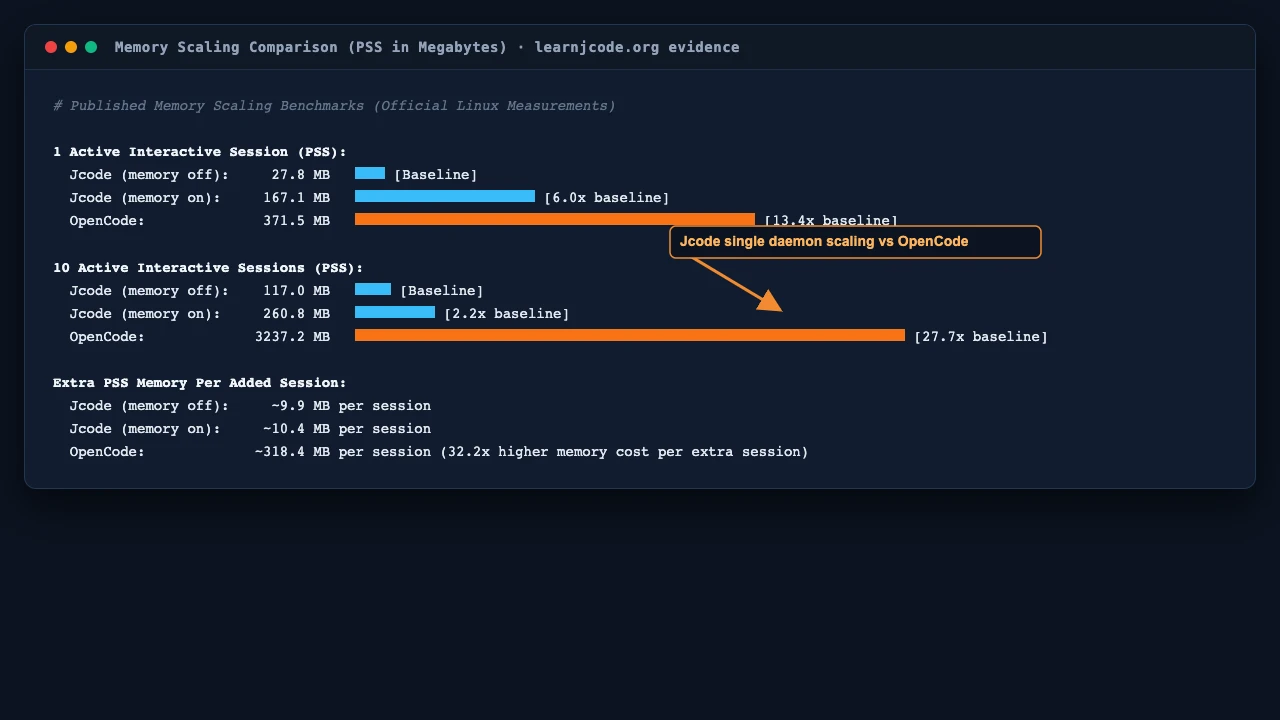
The following benchmark metrics reflect official Linux measurements recording Proportional Set Size (PSS) across interactive sessions:
| Workload Condition | Jcode (Lean Mode) | Jcode (Default) | OpenCode | Scaling Factor |
|---|---|---|---|---|
| 1 Active Session | 27.8 MB | 167.1 MB | 371.5 MB | OpenCode requires 2.2x to 13.4x more RAM |
| 10 Active Sessions | 117.0 MB | 260.8 MB | 3237.2 MB | OpenCode requires 12.4x to 27.7x more RAM |
| Extra Session Cost | ~9.9 MB | ~10.4 MB | ~318.4 MB | OpenCode adds 32.2x more RAM per session |
The underlying reason for this difference lies in process architecture. Jcode runs a central background daemon that shares memory structures across sessions. When local vector embeddings are disabled, Jcode needs only 27.8 MB for an active session and grows by roughly 9.9 MB for each subsequent window.
OpenCode starts a separate full runtime environment for each session. At ten concurrent sessions, OpenCode reaches 3237.2 MB of resident memory, compared to 260.8 MB for standard Jcode and 117.0 MB for lean Jcode. On laptops with 8 GiB or 16 GiB unified memory, this difference determines if background agents can run comfortably alongside compiling applications and web browsers.
5. Startup Speed and Input Responsiveness
Startup responsiveness affects how naturally a tool integrates into day to day terminal usage. A coding assistant invoked frequently for quick git queries or diff inspections must launch with minimal pause.
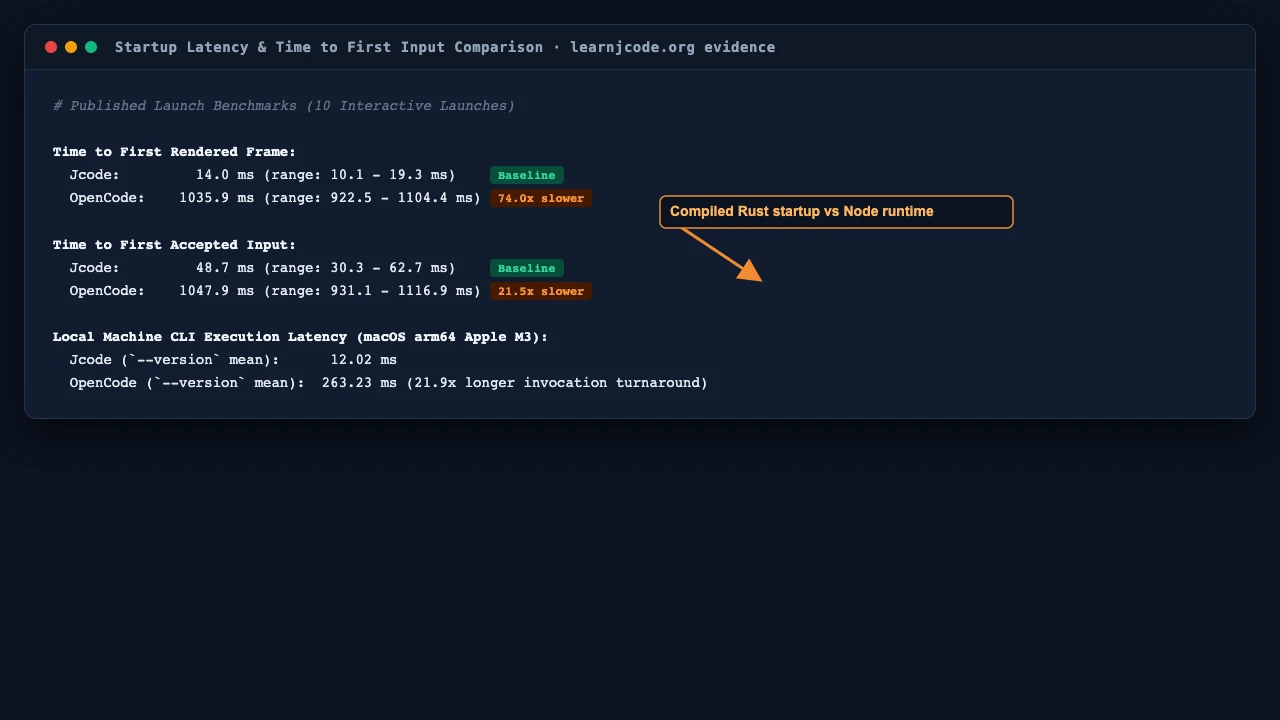
Published launch benchmarks measuring time to first rendered frame and time to first accepted keyboard input show significant divergence:
| Benchmark Measurement | Jcode | OpenCode | Measured Ratio |
|---|---|---|---|
| Time to First Rendered Frame | 14.0 ms (range: 10.1 to 19.3 ms) | 1035.9 ms (range: 922.5 to 1104.4 ms) | OpenCode is 74.0x slower to first frame |
| Time to First Input | 48.7 ms (range: 30.3 to 62.7 ms) | 1047.9 ms (range: 931.1 to 1116.9 ms) | OpenCode is 21.5x slower to accept input |
| Local Version Check Mean | 12.02 ms | 263.23 ms | Jcode executes CLI probe 21.9x faster |
Jcode achieves rapid startup because it is compiled directly from Rust into machine code and renders its terminal interface via its optimized Handterm engine. OpenCode boots a complex runtime stack with TypeScript components, module loaders, and dynamic package resolutions before rendering its interface.
For persistent long running coding sessions, a one second launch delay is negligible. However, for quick script invocations or automated git hooks, sub fifty millisecond launch times provide an experience closer to standard UNIX command line utilities.
6. Deep Feature and Architectural Comparison
Beyond raw resource benchmarks, both platforms take fundamentally different approaches to agent memory, multi agent collaboration, and external tool integration.
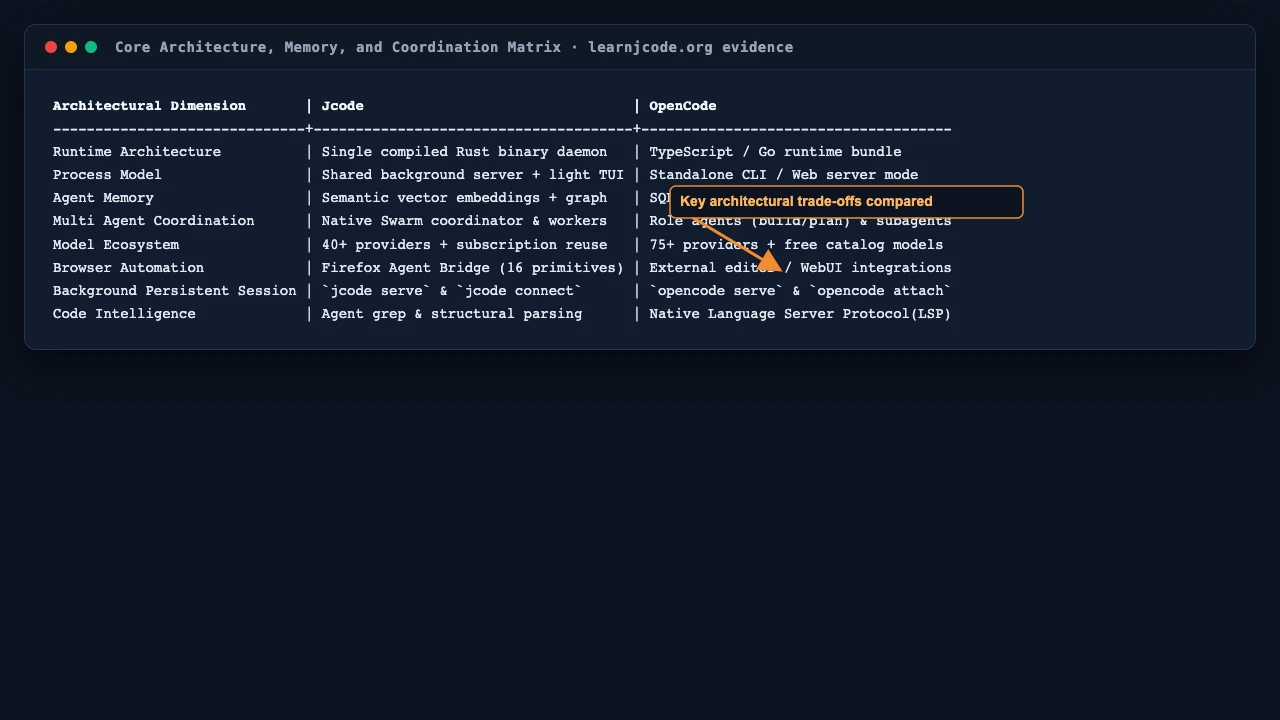
Agent Memory Systems
Jcode implements an active vector memory architecture. Every conversational turn and assistant response is transformed into a semantic vector embedding. At each interaction, Jcode queries an internal memory graph using cosine similarity checks to locate contextually relevant historical decisions, architecture rules, and user preferences. An ambient background process consolidates memories, resolves contradictions, and prunes stale data over time.
OpenCode uses a structured session history model. Past interactions are stored in SQLite and can be exported as structured JSON documents via opencode export. Historical session records can be reloaded with opencode import or continued via session identifiers. It relies on explicit repository documents such as AGENTS.md and plan files rather than background semantic vector graphs.
Multi Agent Collaboration
Jcode includes a native multi agent Swarm coordination layer. A coordinator agent can spawn dedicated worker sessions across separate repository files. When one agent modifies a file that another agent has previously examined, the server sends a change notification to maintain consistency. Agents communicate through direct messages and shared repository broadcast channels.
OpenCode approaches multi agent collaboration through role specialization. Its Build agent handles direct repository editing, while its Plan agent prepares architectural designs in isolated markdown files without touching production code. Delegated general subagents run narrow subtasks under the supervision of the primary agent.
Model Provider Diversity
Jcode connects to over forty providers, including Claude, OpenAI, Gemini, GitHub Copilot, Azure OpenAI, OpenRouter, DeepSeek, and local inference engines such as Ollama and LM Studio. It also supports subscription reuse, enabling developers to connect existing ChatGPT Pro or Claude Max accounts.
OpenCode supports over seventy five providers, featuring native integrations with major cloud vendors, community proxies, and local model hosts. Furthermore, its inclusion of free community model endpoints makes initial experimentation straightforward without requiring payment setup.
Tooling and Interface Options
Jcode incorporates a built in browser automation bridge backed by Firefox, exposing sixteen browser actions (click, type, fill form, evaluate script, screenshot, upload) directly to the model. Its terminal interface includes an optional side panel, Mermaid diagram rendering, and real time token usage monitors.
OpenCode prioritizes developer ergonomics across multiple environments. In addition to its terminal interface, OpenCode provides a web based UI via opencode web, language server protocol integration for IDE diagnostics, and desktop companions that can link to remote development servers.
7. Selecting the Right Tool for Your Workflow
Because Jcode and OpenCode reflect different design priorities, the preferred choice depends on your daily development environment, hardware constraints, and workflow requirements.
Consider Jcode If:
- You run multiple terminal sessions simultaneously: Jcode shared daemon architecture consumes dramatically less RAM across ten or more concurrent sessions.
- You work on resource constrained hardware: Laptops with 8 GiB or 16 GiB RAM benefit significantly from Jcode lean memory footprint.
- You require sub second terminal responsiveness: If you frequently launch quick CLI commands, Jcode instant startup feels immediate.
- You need automatic long term memory recall: Jcode vector embedding graph recalls architectural decisions across sessions without manual prompt repetition.
- You use browser automation: The built in Firefox Agent Bridge handles web tasks natively without external setup.
Consider OpenCode If:
- You want immediate free model access: OpenCode catalog of built in free endpoints allows instant experimentation without credit card registration.
- You prefer a dual agent planning workflow: The separation between read only Plan agents and write enabled Build agents provides transparent safety boundaries.
- You value Language Server Protocol integration: OpenCode incorporates LSP diagnostics directly to assist code verification during edits.
- You need a web interface or editor extension: The ability to launch opencode web or connect IDE plugins offers flexibility beyond the command line.
- You require granular path permission control: OpenCode detailed ask, allow, and deny permission patterns provide precise filesystem boundaries.
To deepen your understanding of Jcode command syntax, visit our commands cheat sheet or read the comprehensive how to use Jcode guide.
8. Methodology and Reproduction Kit
To support independent verification, we have preserved all execution logs, configuration files, test runners, and raw measurement outputs in an exportable reproduction kit.
Download the reproduction kit (ZIP): contains test plans, execution scripts, raw terminal logs, JSON results, and environment manifests. Checksum verified: 5de69502e273a1de06b5869b3765ac2fb182afd54c68c82b7320da641b80eeda.
Click to view reproduction command steps
To reproduce our local measurements on your system, install both utilities and run our test script:
# Extract reproduction kit and run comparative evaluation
unzip jcode-opencode-reproduction.zip
cd jcode-opencode-reproduction
python3 runner.py
The runner script records operating system details, executes Jcode diagnostic commands, probes OpenCode configurations, and collects five run startup latency averages.
Measurement Boundaries and Limits
- Hardware Context: All local measurements reflect one macOS arm64 system with 8 GiB unified memory. Operating characteristics may vary on Linux or Windows platforms.
- Memory Metrics: Multi session memory figures represent published Linux Proportional Set Size (PSS) data from official release testing. Local process RSS figures reflect standalone version checks.
- Inference Costs: Startup and resident memory measurements isolate client and daemon processes; they exclude external cloud inference latency and GPU model weights.
- Release Changes: Software tools evolve continuously. These findings capture Jcode v0.91.0 and OpenCode 1.18.35 as recorded in October 2026.