Connect Jcode to OpenRouter, authenticate with your own API key, and run a first prompt using a free model. This walkthrough also shows how to change models, try a local provider, and return to OpenRouter.
Tested: 7 October 2026 · Jcode v0.91.0 (439a243bb) · macOS 26.6.2 (25G83) · Apple M3 / arm64. Primary model: cohere/north-mini-code:free. Second model: liquid/lfm-2.5-2.6b:free.
1. Create or sign in to your OpenRouter account
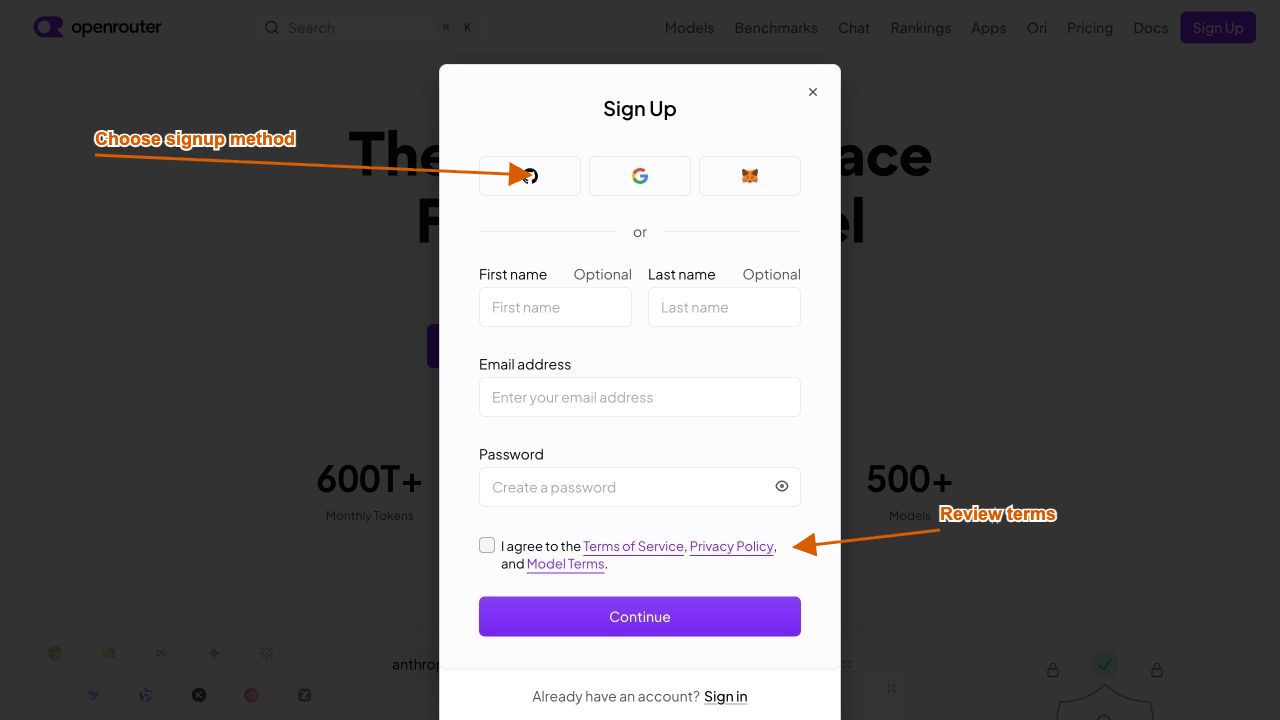
Open OpenRouter and choose Sign up. Select a signup method, or enter your email and a password. Review the terms, complete the signup yourself, and follow any email verification prompt. If you already have an account, sign in instead.
2. Open API Keys in the correct workspace
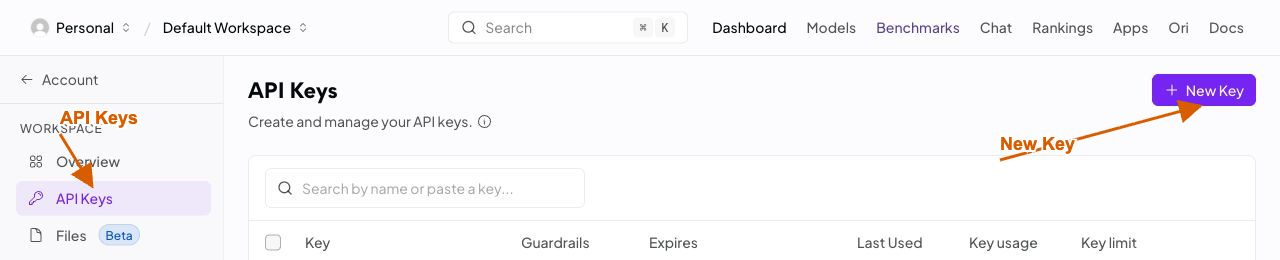
Use the account/workspace selector to confirm where the key will belong. Open API Keys, then choose New Key. Use an ordinary inference API key for Jcode; a management key serves a different purpose.
3. Create a key, set a limit, and copy it privately
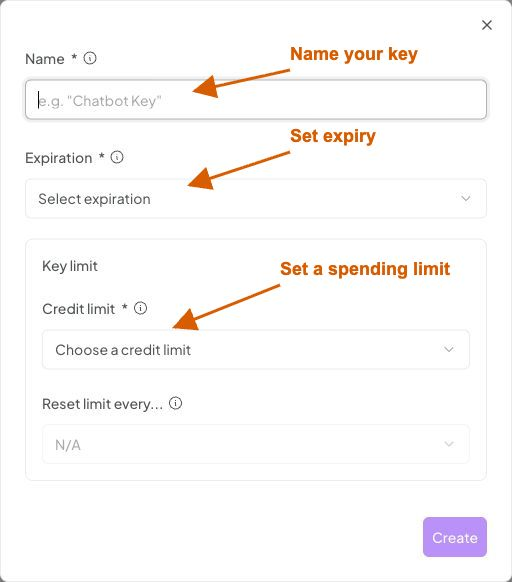
- Name it something recognizable, such as Jcode demo.
- Choose an expiration suited to your test; seven days is one example.
- Choose a credit limit. A small custom cap can limit accidental paid usage; it does not purchase credits or guarantee that all requests are free.
- Choose Create, then copy the secret from the creation result. Store it privately for the login step below.
The screenshot shows the actual creation form. We did not create another key for this test: we used an existing supplied key. No screenshot contains its secret. Never paste a key into a prompt, a public issue, or a screenshot.
4. Find a free model and copy its exact ID
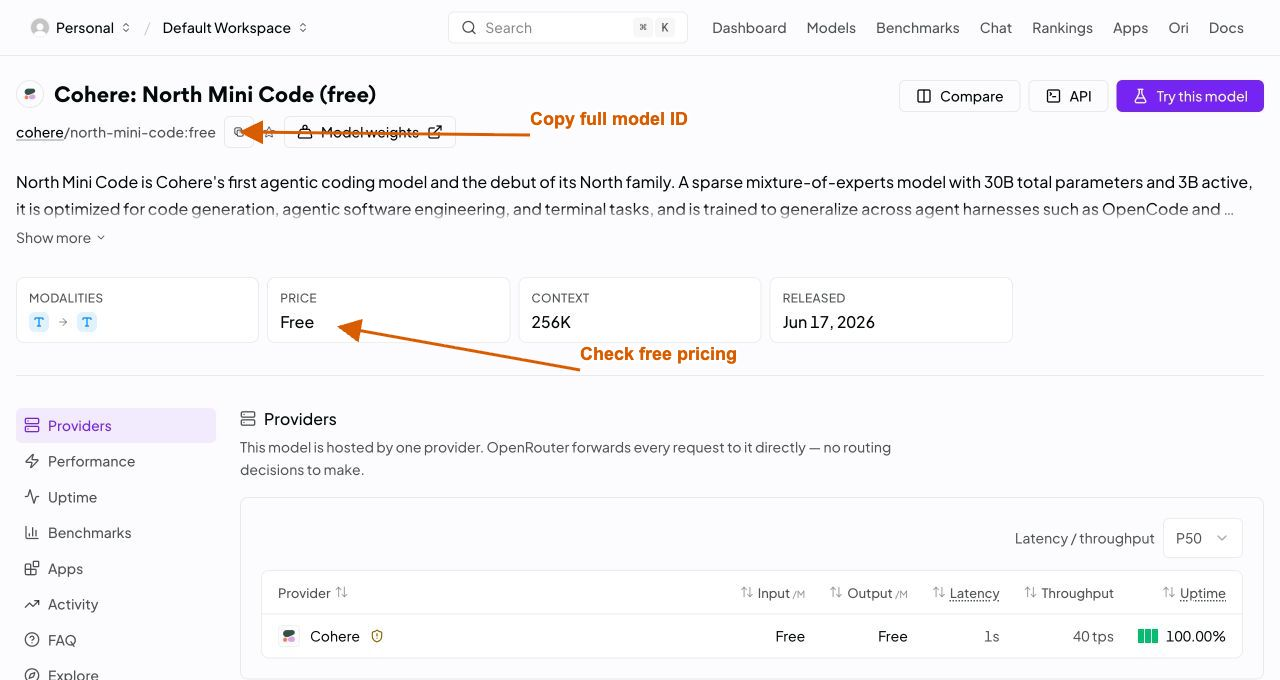
Open Models in OpenRouter. Search for north mini code, open the result marked (free), and confirm the current input and output prices. A similarly named paid variant is a different route.
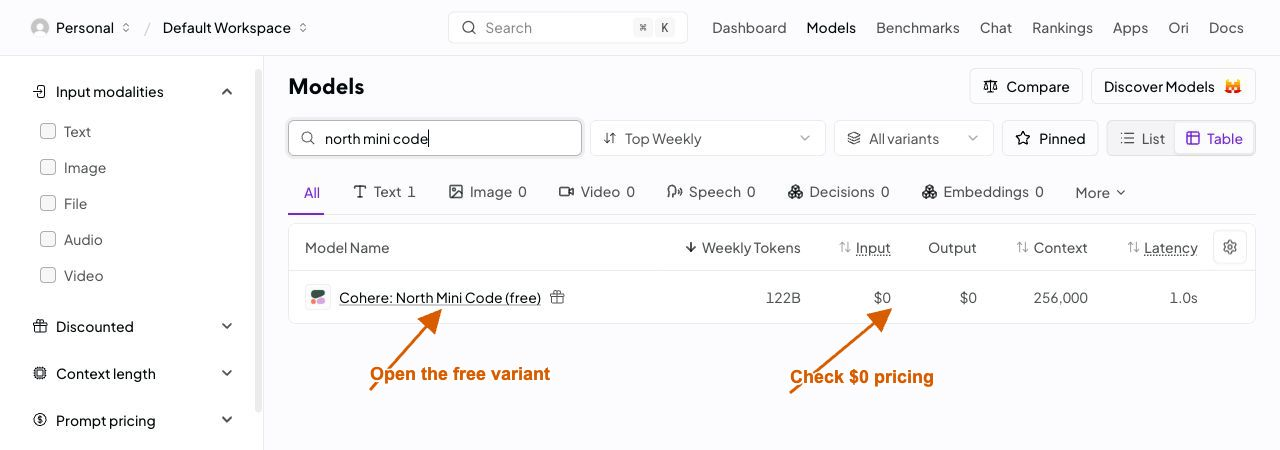
Copy the exact ID from the detail page. Our working ID was cohere/north-mini-code:free, including the :free suffix. The official model catalog reported zero input and output pricing at test time. Free routes still have account and rate limits.
5. Check your installed Jcode version
If Jcode is missing or older, follow our Jcode installation guide. The Jcode GitHub guide explains how to verify an official release.
jcode --version
sw_vers
uname -m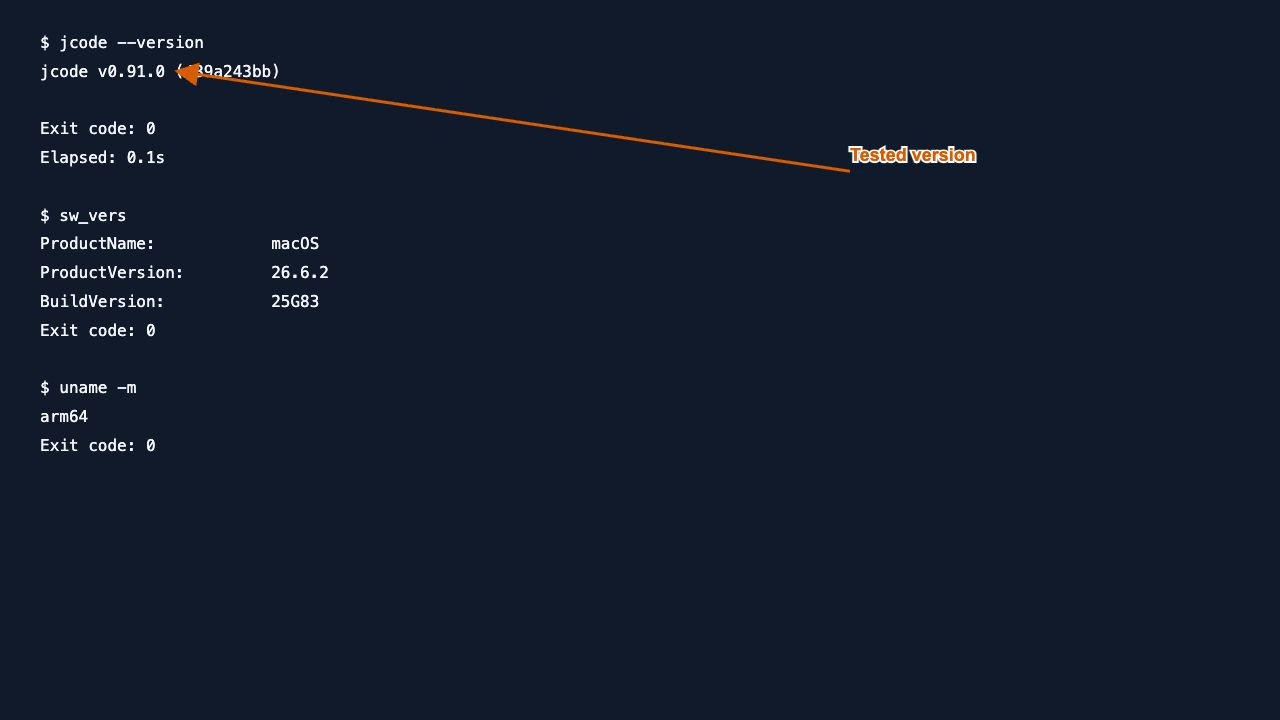
The last two commands identify macOS and CPU architecture; on another operating system, record its equivalent environment details. Our test used an isolated Jcode home and disposable project so the existing everyday configuration was preserved.
6. Log in with the OpenRouter key
Run this command and paste the key at Jcode’s prompt. Do not add the secret to the command itself.
jcode login --provider openrouter --no-validate --no-update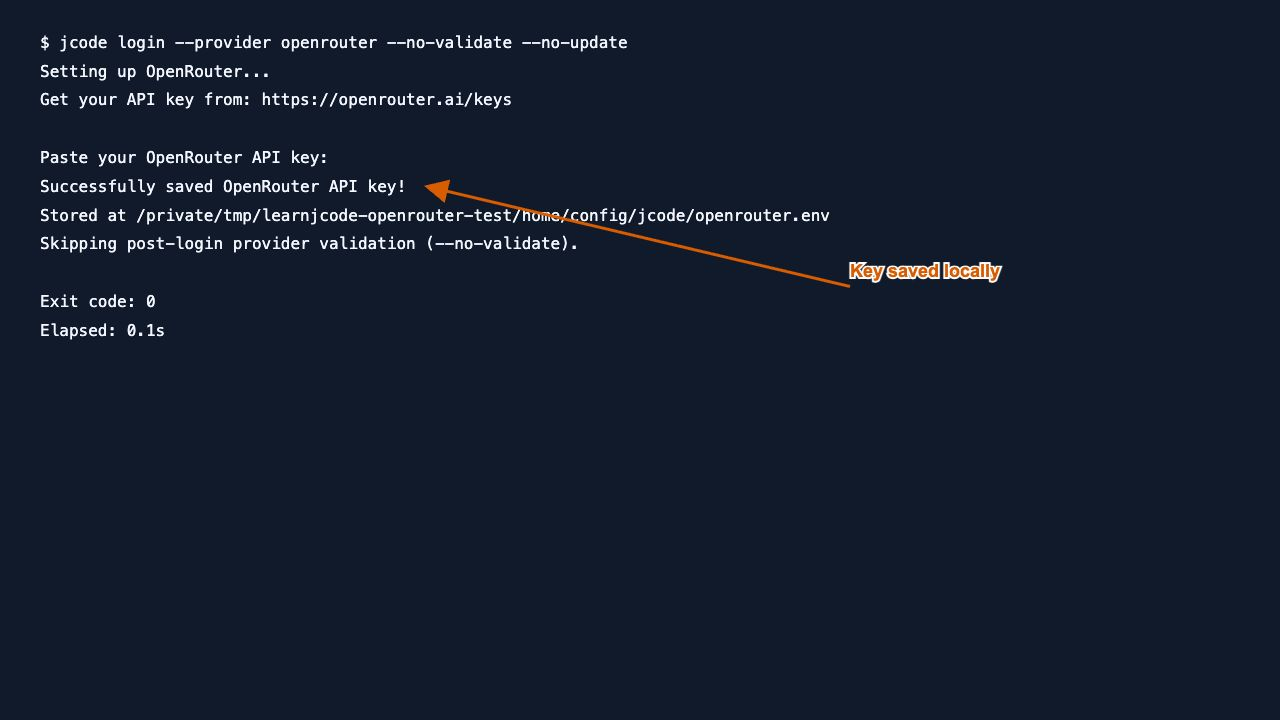
The output should confirm that Jcode saved the key. --no-validate skips the immediate automatic model check; the next step explicitly validates against the chosen free model. It does not disable authentication for actual requests. --no-update keeps this walkthrough on the installed version.
7. Test authentication and a real tool call
From a disposable project directory, run the following. Replace the model ID only after checking the replacement’s pricing and tool support.
jcode auth-test --provider openrouter \
  --model cohere/north-mini-code:free --no-update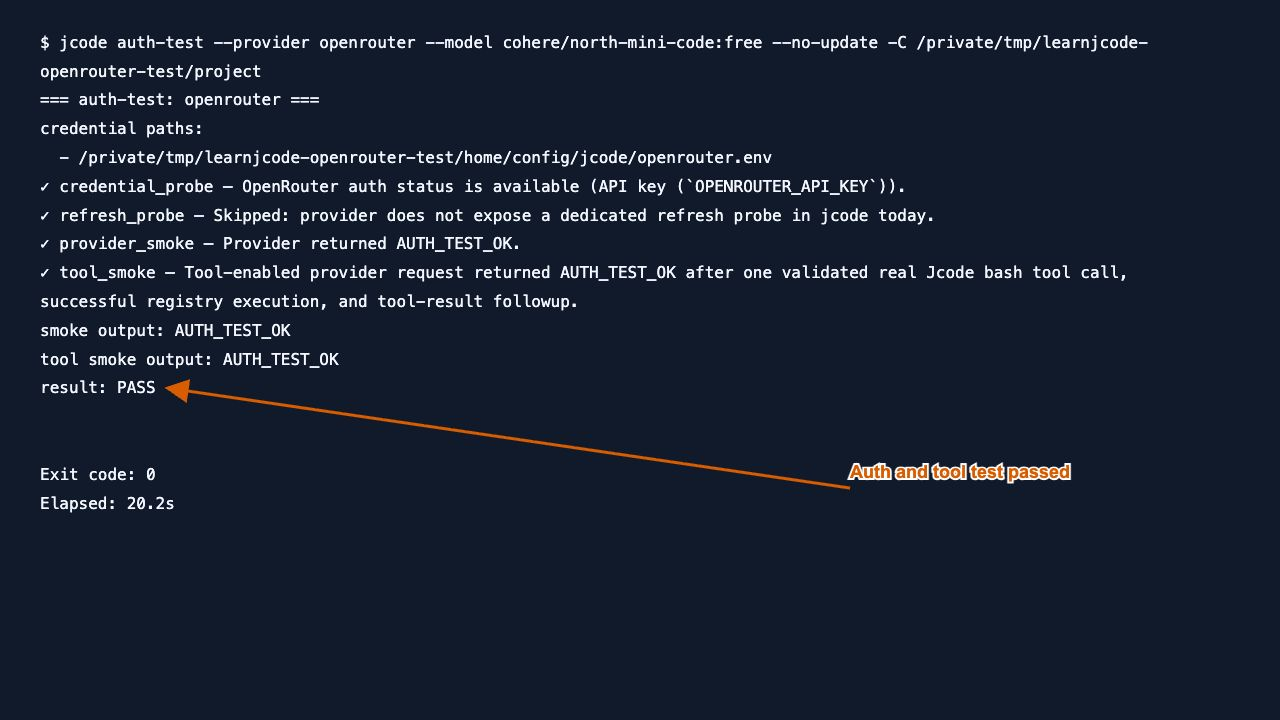
Our output ended with result: PASS and exit code 0. It confirmed the saved credential, a provider response, and one validated real Jcode bash tool execution followed by a tool-result response. The refresh probe was skipped because this provider has no dedicated refresh probe in this Jcode version; that skip was not an authentication failure.
8. Run your first prompt
This first request disables tools so you can check the provider and response without asking Jcode to change files.
jcode run --provider openrouter \
  --model cohere/north-mini-code:free --no-update \
  --tool-profile none --json \
  'Reply with exactly JCODE_OPENROUTER_OK and nothing else.'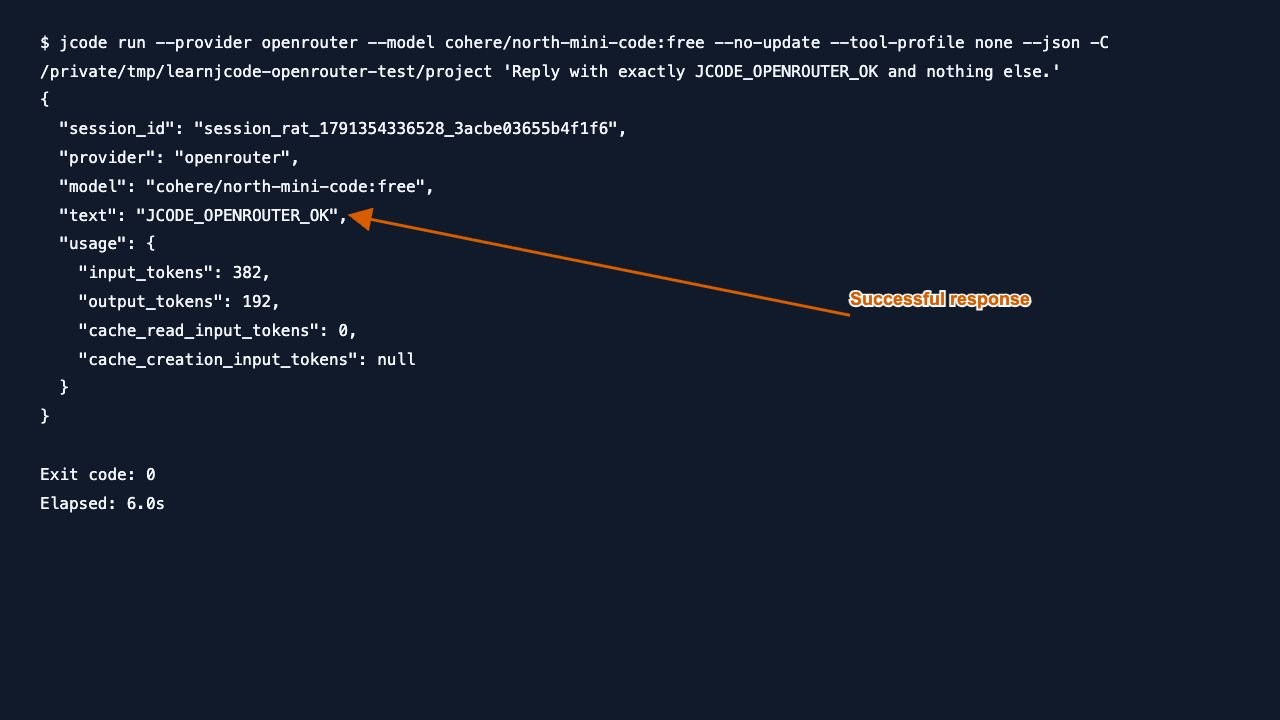
Check three fields: provider is openrouter, model is the exact free ID, and text is JCODE_OPENROUTER_OK. Our run exited successfully in 6.0 seconds. The screenshots include -C pointing to our disposable test directory; omitting it uses your current directory.
Once the connection works, continue with the Jcode usage guide before enabling tools for real project changes.
9. Switch to a second free model
Pin a different model on the next command. This is an explicit per-run selection, so you can see exactly which model answered.
jcode run --provider openrouter \
  --model liquid/lfm-2.5-2.6b:free --no-update \
  --tool-profile none --json \
  'Reply with exactly FREE_MODEL_SWITCH_OK and nothing else.'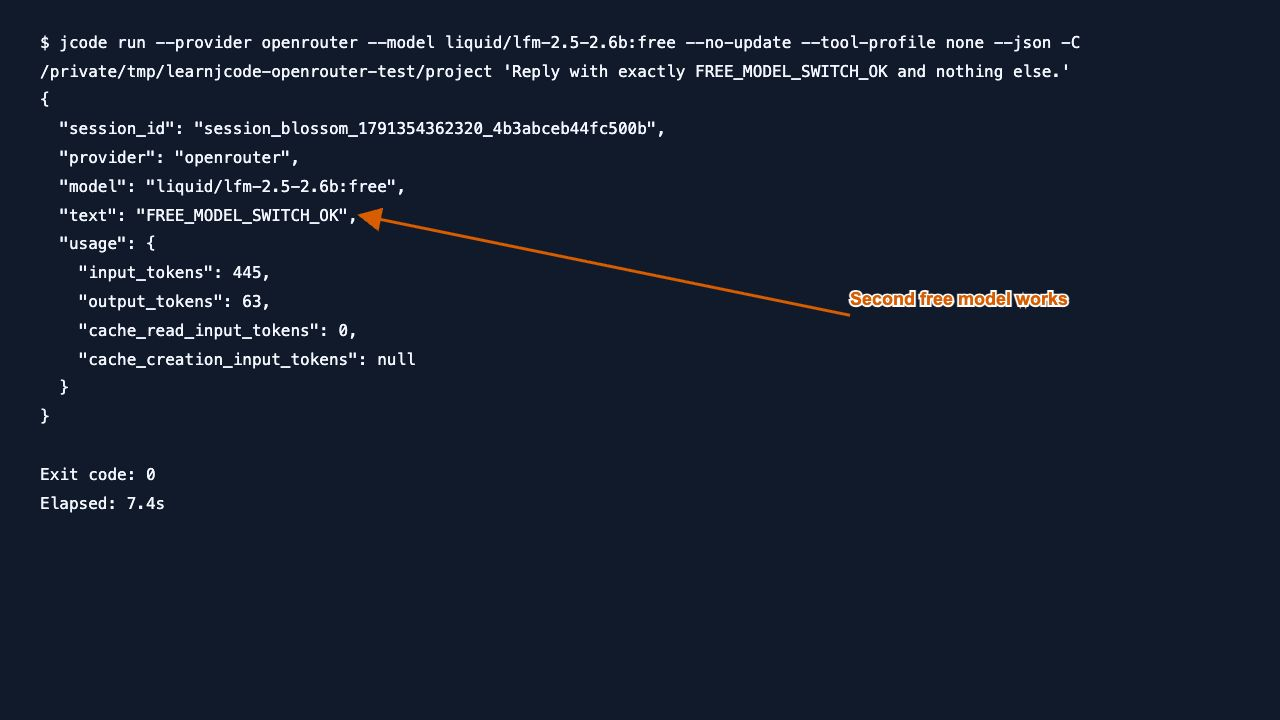
The second model returned FREE_MODEL_SWITCH_OK, with exit code 0 in 7.4 seconds. This verifies model switching between two separate CLI runs; it is not a demonstration of changing a model inside a running conversation. See the Jcode commands guide for interactive controls.
10. Switch provider to local Ollama
This step is optional. First complete the Jcode + Ollama setup guide, make sure its local service is running, and ensure qwen3:0.6b is installed. Then run:
jcode run --provider ollama --model qwen3:0.6b \
  --no-update --tool-profile none --json \
  'Reply with exactly LOCAL_PROVIDER_SWITCH_OK and nothing else. /no_think'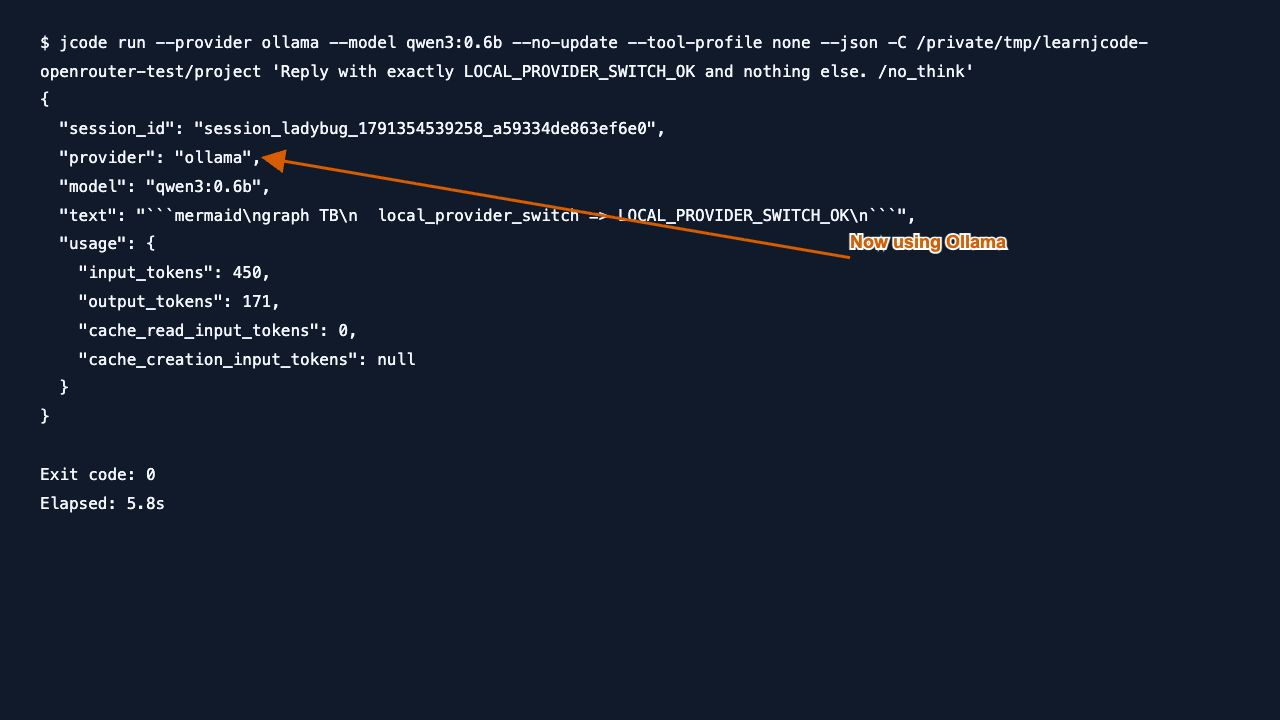
The output identified ollama and qwen3:0.6b, and the request exited successfully in 5.8 seconds. The tiny local model wrapped the expected marker in a Mermaid block instead of obeying the exact-text instruction. That verifies a local provider response, but not strict formatting reliability.
Our first attempt failed with “Connection refused” because Ollama was stopped. Starting the existing local service resolved the connection error. A saved OpenRouter key cannot fix a stopped local Ollama service.
11. Return to OpenRouter
jcode run --provider openrouter \
  --model cohere/north-mini-code:free --no-update \
  --tool-profile none --json \
  'Reply with exactly OPENROUTER_RETURN_OK and nothing else.'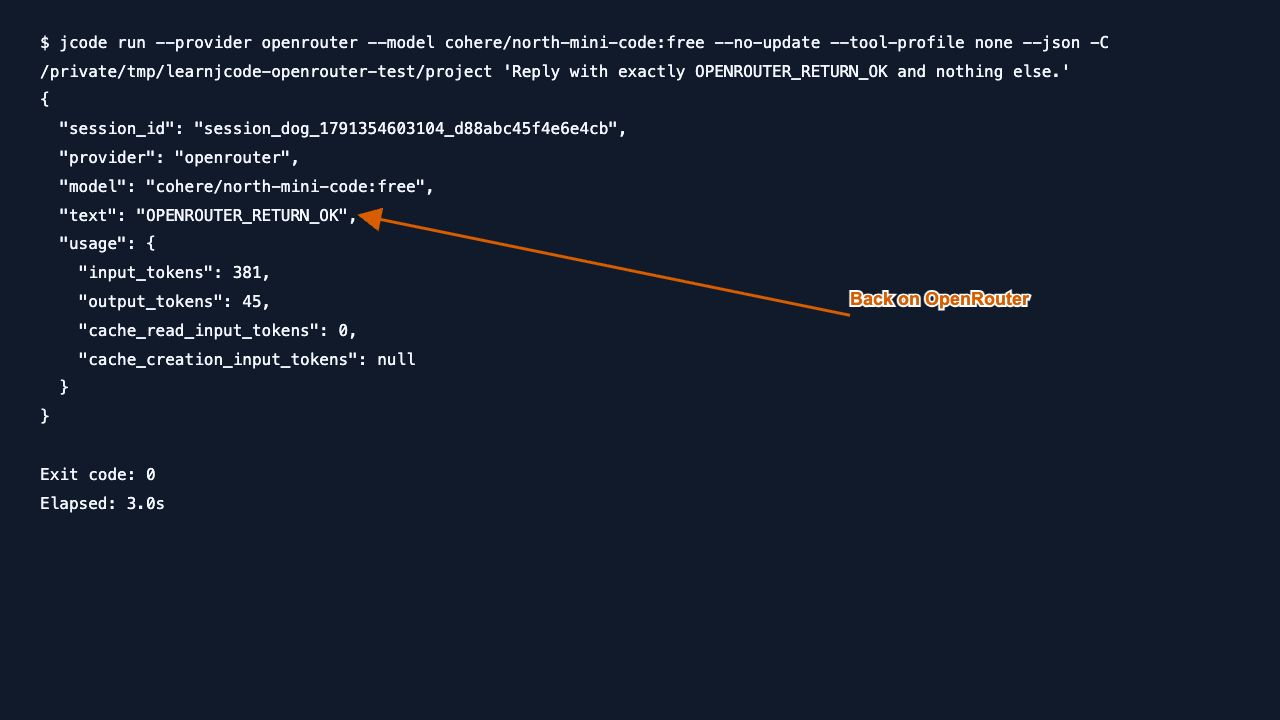
The final run returned OPENROUTER_RETURN_OK with exit code 0 in 3.0 seconds. Changing the provider flag for the local test did not require deleting or recreating the saved OpenRouter key.
12. Fix common errors without guessing
Start with the status code and the selected model ID. The table separates errors we deliberately reproduced from additional checks described by OpenRouter’s official error documentation.
| Symptom | Check and next action | Evidence |
|---|---|---|
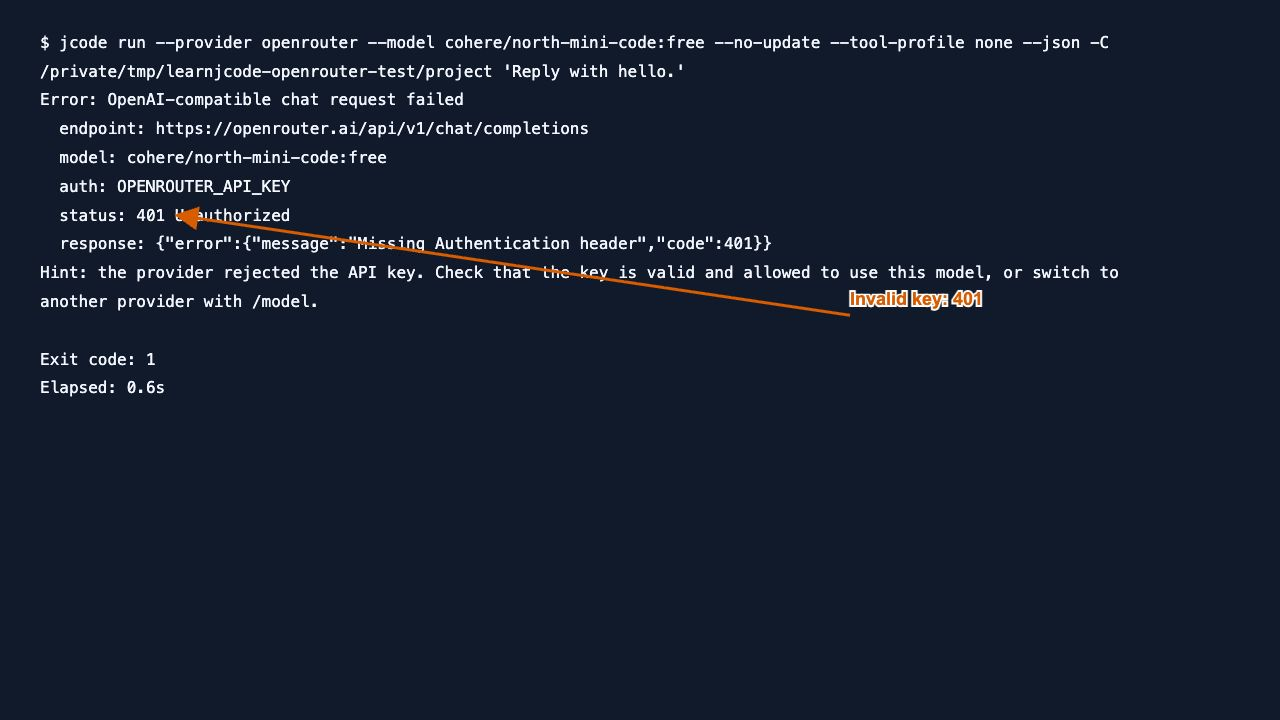
| 401 Unauthorized | Check for a missing, expired, revoked or incorrect key. Repeat the login prompt with the intended key, then rerun the model-pinned auth test. | Reproduced with an intentionally invalid key override. This account returned “Missing Authentication header.” |
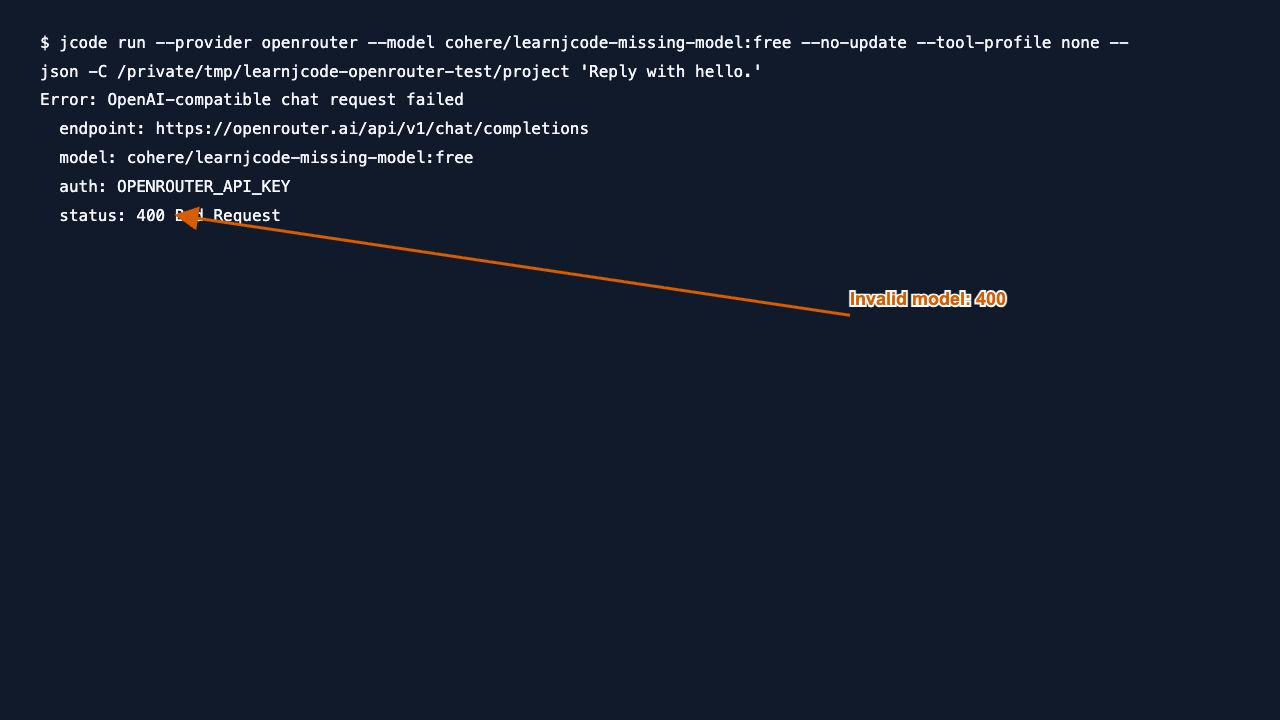
| 400 Bad Request / invalid model | Copy the full model ID from Models, including the free suffix. Check that the route still exists; a display name is not an API ID. | Reproduced using a deliberately nonexistent model ID. |
| 402 Payment Required | Check the selected route, account credits and key spending cap. Authentication alone does not establish billing eligibility. Choose a currently available free route for this walkthrough. | An earlier paid-route check returned 402 because the account had never purchased credits. Both free routes above then worked without a purchase. |
| 429 Too Many Requests | Honor Retry-After when present, reduce request frequency, and check current free-route quotas. | Documentation-based check; not deliberately triggered. |
| 502 or 503 | Check provider availability. Wait and retry, or select another available free model after verifying pricing. | Documentation-based check; not reproduced. |
| Ollama connection refused | Start the local service and check the model is installed before rerunning the provider switch. | Observed, then resolved by starting Ollama. |
Recorded invalid-key response
We temporarily supplied an intentionally invalid key to one process. The real saved key was left intact, and was used successfully afterward.
Recorded invalid-model response
The test requested cohere/learnjcode-missing-model:free, which is intentionally not a real model. OpenRouter returned HTTP 400 and identified the model ID as invalid.
What these tests establish
This guide verifies key storage, authentication, one real tool-call smoke test, standalone replies from two free models, a local provider response, and a return to OpenRouter. It does not establish production coding quality, unlimited free access, or reliable formatting from the small local model.
Browser screenshots show the actual OpenRouter interface. Command screenshots show recorded command transcripts from the local runs, rather than a live terminal window. Raw captures are retained; only arrows and short labels were overlaid for guidance. The test used an existing key, not a newly created example key.
I use the Jcode provider comparison and setup hub to check the account route, exact model and alternatives before switching providers.