Learn Jcode / Troubleshooting
Jcode errors: find the cause.
Check the fix.
A practical troubleshooting hub for installation, login, model providers, MCP servers, browser automation and editor problems. Start with the symptom, match your version, then verify one change at a time.
Where does it fail?
Choose a category or use your browser’s Find command to search the exact error text. Each entry below includes a cause, a recovery path and a check that tells you whether the change worked.
Before you change anything
- Record the version and the failing layer. Run
jcode --version. Save the exact error, the OS, the terminal or editor name, and the command that triggered it. - Read the last useful error, not only the last line. A model error after an MCP startup failure can be a secondary symptom. Identify the first failing component.
- Keep the working configuration. Copy the file you intend to edit and make one change at a time. Do not purge your configuration, authentication or saved sessions as a first troubleshooting step.
- Verify with the smallest task. A resolved executable path, a successful JSON parse, an authenticated model response and a working browser bridge prove different things.
How to read the labels
Locally verified applies only to the stated check and build. Documented means the command or behavior is supported by the linked source. Closed upstream is an issue-tracker state, not a guarantee that your installed binary contains the fix. Where a first fixed release is not established, this guide says so.
Install troubleshooting
Install: symptoms and fixes
Jcode is installed, but the command is not found
Your shell reports “command not found: jcode”, or PowerShell cannot resolve jcode.
This happens before a model or login is involved. The shell must find the launcher on PATH. Start with a fresh terminal because an installer can update your shell configuration without updating the terminal window that was already open.
- Run the checks below. On macOS or Linux,
command -vshows the selected executable andtype -aexposes duplicate installations. On Windows, useGet-Command. - For the standard shell installer, check
~/.local/bin/jcode. If that file exists and runs directly, the installation may be fine and PATH is the problem. Homebrew and custom installations can use different locations; do not add a guessed directory. - For the Windows installer, check
%LOCALAPPDATA%\jcode\bin. Close and reopen the terminal after installation. If multiple copies appear, identify the intended installation before removing anything.
jcode --version
command -v jcode
type -a jcode
PowerShell:
jcode --version
Get-Command jcode -All
If the standard Unix launcher exists, test it directly with ~/.local/bin/jcode --version. Add that directory to your shell startup configuration only after confirming it is the correct installation. A reinstall is not the first fix for a stale shell.
jcode --version. It should report the intended version, and the resolved path should match the installation you chose.Evidence: Unix installer PATH handling; Windows installation paths; our installation guide.
Back to the error index ↑Windows installer cannot find or verify a release asset
No matching prebuilt Windows asset, missing SHA256SUMS, or a SHA256 verification failure.
These messages describe different failures. A missing asset means the requested release lacks the binary for your architecture. A checksum failure means the downloaded file does not match the published manifest. Neither should be treated as an invitation to skip verification.
- Record the requested release and whether the machine is x64 or ARM64. Check the assets on that exact official GitHub release, not a similarly named file from another site.
- For a failed or incomplete download, retry the official installer after checking connectivity. If the checksum still differs, stop and report the release name, asset name and expected/actual hashes. Do not install that file.
- If there is no matching asset, use an official release that includes your architecture or deliberately choose a source build. The documented Windows source build requires Git, Rust and Visual Studio 2022 Build Tools with the Desktop development with C++ workload.
The installer supports -BuildFromSource when you explicitly choose that route. It intentionally avoids launching a long compilation without your request. SmartScreen reputation prompts and a checksum mismatch are separate problems; changing Windows security settings does not repair a mismatched download.
jcode --version works from a newly opened PowerShell window. If verification still fails, preserve the error instead of bypassing it.Evidence: Windows installer verification and asset checks; official releases.
Back to the error index ↑Auth troubleshooting
Auth: symptoms and fixes
Login exits with “No API key provided”
An API provider asks for a key, skips input, or leaves the model list empty.
The Windows report combines credential entry trouble with an empty model picker. An empty picker alone is not proof that the key is invalid. First identify whether you are using a subscription login or a direct API provider; their credentials are not interchangeable.
- Run login from an ordinary terminal rather than the in-session selector. If your service has a named profile, choose it explicitly. For DeepSeek, the documented command is shown below.
- Enter the key at the secure prompt. Avoid putting the actual key into a shared command, screenshot or issue. For a custom endpoint, use the current login options or the documented provider profile setup.
- Choose a model your account can access, then test that same provider. A missing key, an unavailable model, and a rate limit require different fixes.
jcode login --provider deepseek
jcode --provider deepseek auth-test
The second command performs live provider checks and can consume API usage. This guide checked its command options, but did not run it against a paid account. If the prompt still skips input, include the terminal name, PowerShell version and jcode version in a report.
Evidence: Upstream issue #82; provider setup documentation; provider guide.
Back to the error index ↑OAuth callback says no pending login state was found
No pending openai login state found, or the pending login has expired.
The callback URL completes a login that must already have started on this machine. It is not a standalone credential. This error can appear when the first step was skipped, a different jcode configuration is active, or temporary state has expired.
- Start a fresh login flow in the same shell environment and jcode configuration that will complete it. For a remote session, use the headless option or the two-step flow below.
- Open the newly printed authorization URL and finish provider approval. Use the callback from this new attempt, not one copied from a previous attempt.
- Complete the flow on the original machine. Treat the callback URL and authorization code as credentials; do not post them in an issue or screenshot.
jcode login --provider openai --print-auth-url --jsonThen run jcode login --provider openai --callback-url with your newly returned callback as its quoted argument. If the state expires, repeat the first step. Jcode stores temporary state under ~/.jcode/pending-login/; deleting your entire configuration is unnecessary.
What we tested: a callback with dummy values and no pending state returned the expected actionable error. We did not complete a real OAuth login.
Evidence: pending login validation; headless login workflow.
Back to the error index ↑Provider troubleshooting
Provider: symptoms and fixes
Tested 16 October 2026 on v0.98.1: I checked auth and model errors, local named-profile switching, and an older-daemon attach. Follow my current provider troubleshooting guide with screenshots. It separates verified recovery from historical reports and from hosted OAuth behavior I did not test.
Ollama returns “model not found” / HTTP 404
Jcode reaches the local chat endpoint, but the response names a model that the server cannot find.
I reproduced this by requesting qwen3:0.6b-learnjcode-missing. Ollama returned HTTP 404 and Jcode exited with code 1. I pulled the correct qwen3:0.6b tag, then reran the same prompt with that name: Jcode returned OK. and exited with code 0. The correct model was cached; the pull revalidated it.
- I check
ollama liston the server Jcode actually uses. - I pull the intended real tag and wait for
success. - I rerun Jcode with that exact tag and verify a response, not just a saved setting.
Follow my tested Ollama fix with screenshots, exact errors and recovery logs →
Back to the error index ↑A public HTTP provider URL is rejected
The provider base URL is rejected when a hosted endpoint starts with http://.
Jcode rejects unencrypted HTTP for public provider hosts. Localhost and supported private network addresses are handled differently for local runtimes. Keep the endpoint your provider documents, including its required API path; changing the protocol is not a substitute for a real TLS-enabled service.
- Check the provider documentation for the exact HTTPS base URL. Do not paste a browser dashboard URL or a full chat completion route into the base URL field.
- Create the profile with that HTTPS base and an exact model identifier. Use the secure prompt or stdin-based key handling for a real API service.
- If you are configuring a local runtime, confirm which address and port the runtime actually listens on. A localhost URL on a remote machine refers to that remote machine, not your laptop.
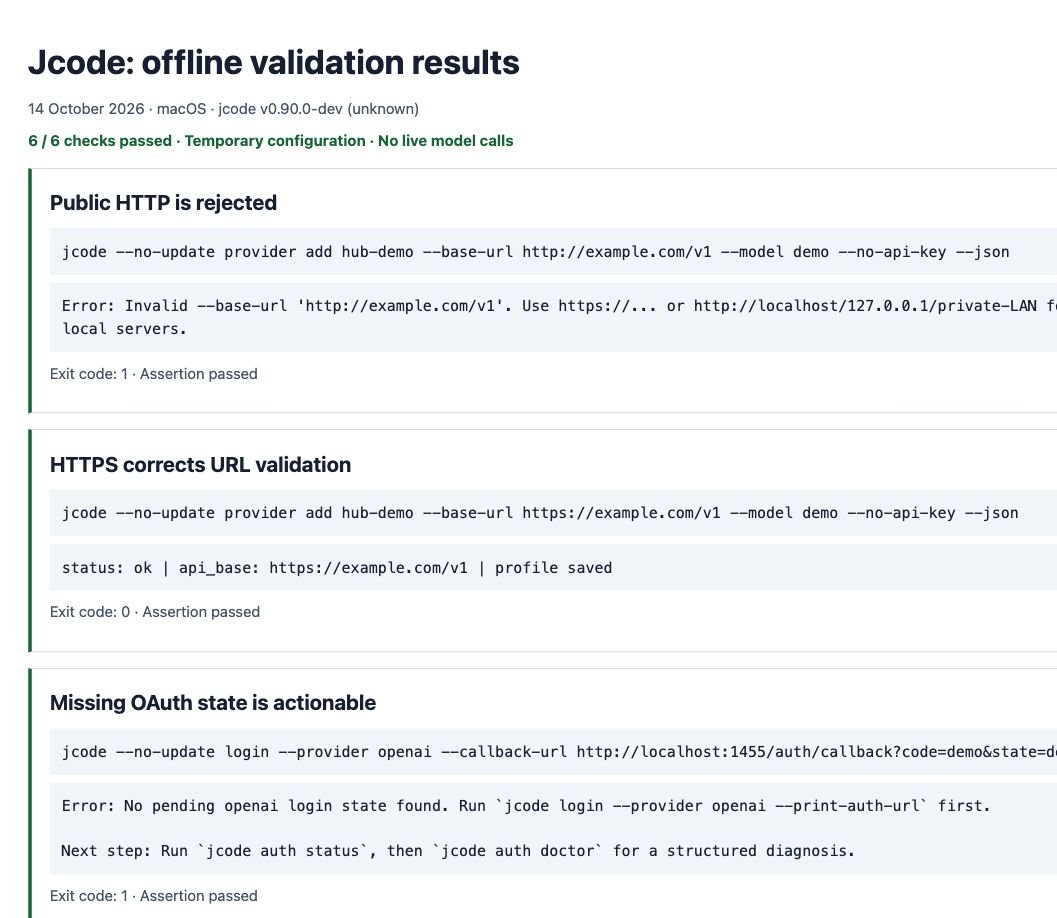
Offline validation demonstration only: the commands below use example.com and a dummy model. They are not a working model endpoint.
jcode provider add hub-demo --base-url http://example.com/v1 --model demo --no-api-key
# Expected: URL rejected
jcode provider add hub-demo --base-url https://example.com/v1 --model demo --no-api-key
# Expected: profile configuration accepted
Our test rejected the first URL and accepted the second in a temporary configuration. No request to a model was made. Acceptance of a URL proves the configuration passes validation, not that the host has an API.
jcode --provider-profile YOUR_PROFILE auth-test with YOUR_PROFILE replaced by its name. Check for a successful response, not merely a saved configuration.Evidence: API base URL validation; OpenRouter setup.
Back to the error index ↑A slow reasoning model hits a stream idle timeout
A request begins but fails while waiting for the next streamed output.
An idle timeout measures silence on the response stream. It is different from a refused TCP connection, a wrong model name, or an authentication failure. A slow local model can spend time loading or reasoning before sending text, but a disconnected server can look silent too.
- Check the server or provider first. Confirm the model is loaded and a minimal request works in its own client. For local models, check memory availability and whether the endpoint lists the expected model identifier.
- If the model works but regularly has a long silent phase, try a larger streaming idle timeout for one launch. Use the shell-specific example below.
- Retry a short prompt before retrying the original long task. Increasing the timeout cannot fix a wrong API base, a 401 response, or an unavailable model.
JCODE_STREAM_IDLE_TIMEOUT_SECS=600 jcodePowerShell: set the value in the current shell before launching. Remove the variable or close the shell when the test is finished.
$env:JCODE_STREAM_IDLE_TIMEOUT_SECS = "600"
jcode
The reviewed README describes a 180-second base value and additional scaling at high reasoning effort. Avoid assuming every request will stop after exactly 180 seconds. For an enduring change, the documented configuration field is [provider] stream_idle_timeout_secs.
Evidence: stream timeout setting; local model setup.
Back to the error index ↑MCP troubleshooting
MCP: symptoms and fixes
Current MCP checks: I verified working, exiting and silent stdio fixtures on v0.98.1, plus slow-tool timeout recovery. Use the refreshed MCP diagnostics with exact timings and screenshots.
The MCP configuration cannot be parsed
An MCP server disappears after editing mcp.json, or a parse error names that file.
Jcode uses a separate JSON file for MCP servers. Pasting the server object into config.toml, leaving a trailing comma, or using unescaped Windows backslashes can prevent the intended configuration from loading. A file that is valid JSON can still contain a wrong executable path, so check syntax and startup separately.
- Back up the exact file you plan to edit. The normal locations are
~/.jcode/mcp.jsonfor global settings and.jcode/mcp.jsoninside a project. - Validate that file locally. The Python command below checks JSON syntax and discards formatted output so it does not print embedded values. On systems without Python, use a trusted local editor’s JSON validation.
- Correct only the reported syntax problem and validate again. JSON keys and strings need double quotes. Do not put comments or trailing commas into JSON. In Windows paths, escape backslashes or use a path format supported by that server.
python3 -m json.tool ~/.jcode/mcp.json > /dev/nullPowerShell equivalent:
Get-Content "$env:USERPROFILE\.jcode\mcp.json" -Raw | ConvertFrom-Json | Out-NullOnce the JSON parses, confirm that the server executable exists and can be started in the same environment as jcode. Preserve the rest of your working server configuration rather than replacing the whole file with an example.
Evidence: MCP configuration loader; MCP configuration guide.
Back to the error index ↑An MCP server receives a literal ${VAR} value
A server gets a literal variable reference and later fails authentication or cannot find a file.
Issue #789 documented configuration values reaching the child process without expansion. The current source has an expansion pass for command arguments, environment values, URLs and headers. Do not assume the historical behavior applies to every newer release, or that a closed issue tells you the first fixed release.
- Record your exact jcode version. Compare the issue and release information before using an old workaround.
- Check whether the required variable is available to the process that launches jcode. A terminal-launched process and an editor-launched process may inherit different environments.
- On an older build, an absolute executable path avoids a path expansion dependency. For credentials, use the server’s documented environment support and verify what jcode forwards. Do not replace placeholders with real secrets in shared project files.
If the problem survives an update, distinguish an unset variable from an expansion bug. Use a harmless test value in a disposable configuration rather than logging an actual API key.
Evidence: Upstream issue #789; current expansion implementation.
Back to the error index ↑An MCP request reaches its timeout
A live server does not answer initialization or a tool call within its configured budget.
I tested a three-second local tool with a one-second timeout: it failed in 1.014 seconds. I changed only that server’s timeout_secs to 5, reloaded MCP and repeated the call. It succeeded in 3.613 seconds.
An exited server is different: my fixture failed initialization in 0.035 seconds even with a very large timeout. I fix its command or startup error rather than extend the wait.
jcode mcp test NAME, then repeat one harmless real tool call. A name appearing in jcode mcp list is not a connection test.Follow the current MCP diagnostic steps and before/after screenshots. The guide marks #1517, #1174, #802 and #617 with their checked status and separates those reports from local results.
Back to the error index ↑Browser troubleshooting
Browser: symptoms and fixes
Windows browser setup cannot find the native host
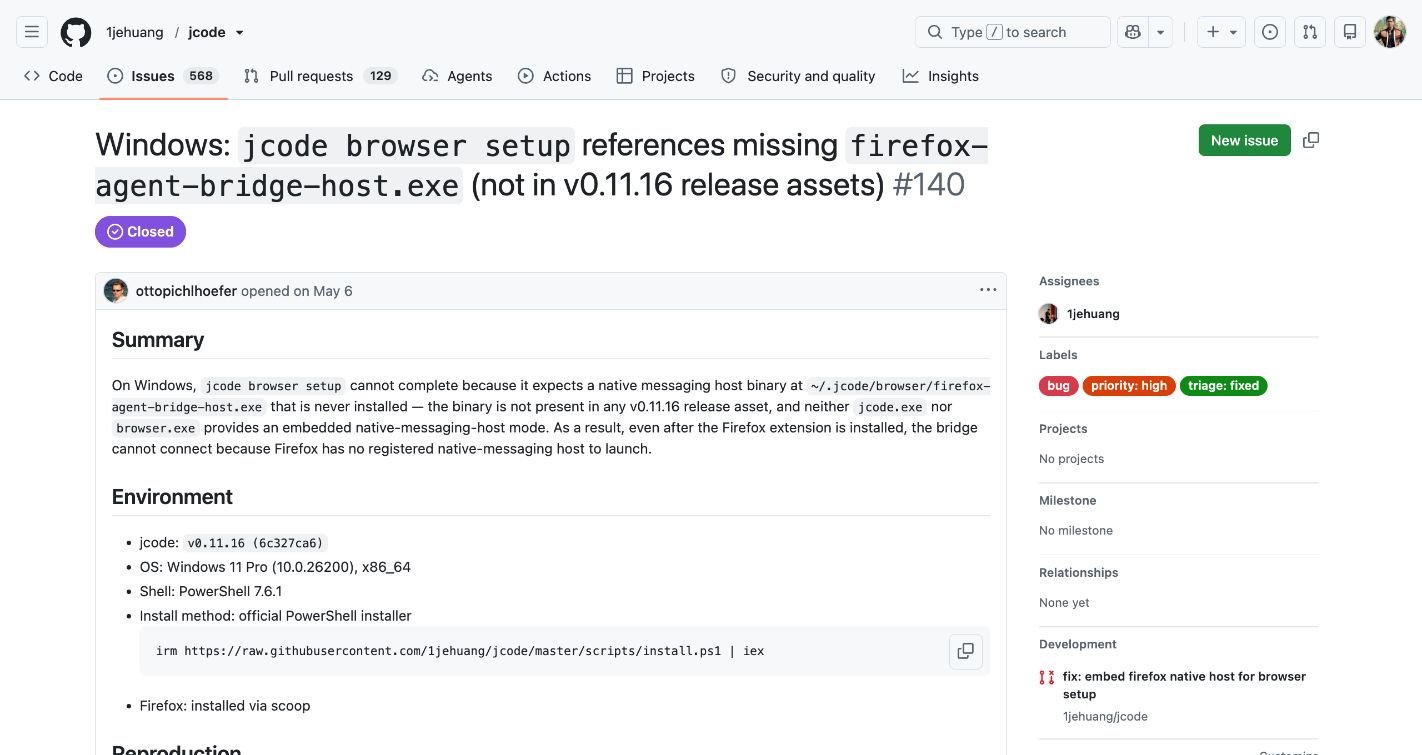
Browser setup names a missing firefox-agent-bridge-host.exe.
Issue #140 describes a specific packaging problem: the Windows release did not include the native messaging host needed by the browser bridge. The report says normal jcode use and provider authentication worked. Repeating login therefore does not address this failure.
- Run
jcode --versionandjcode browser status. Match the actual message to the historical report; “bridge not responding” alone does not establish a missing host. - If you are on the affected old release, move to an official newer release using your installation method. Consult its assets and release notes. We have not established the first fixed release.
- Run browser setup for that installed version and follow its browser/extension instructions. Restart the relevant browser if setup asks you to do so, then check status again.
jcode --version
jcode browser status
jcode browser setup
jcode browser status
Do not download a similarly named executable from an unrelated website or copy a manifest that points to a nonexistent binary. The native host and extension must belong to the supported setup for your installation.
Evidence: Upstream issue #140; browser automation guide.
The bridge is not responding or reports a mismatch
Browser status shows setup incomplete, bridge not responding, or extension/bridge mismatch.
Read the explanatory paragraph below the status fields. On our machine, the installed build reported Chrome as the default browser and said it could not detect Chrome running. Chrome was visible to our browser tools, so that status alone was not reliable proof that the browser was closed. It may reflect the process visibility of the environment used for the check.
- Run
jcode browser statusfrom your normal interactive terminal. Note which browser it names instead of assuming that every version requires Firefox. - Open the named browser and check whether the extension is installed and enabled in that browser profile. A running browser with the wrong profile can still lack the bridge.
- If setup is missing or the version pair remains incompatible, follow
jcode browser setupfor your installed build. Recheck status before repeating model requests.
Separate this general connection diagnostic from the old Windows missing-host bug. If the terminal and a restricted automation environment disagree, include both observations in the report rather than claiming setup is universally broken.
Evidence: browser status/setup entry point; browser setup walkthrough.
Back to the error index ↑Editor troubleshooting
Editor: symptoms and fixes
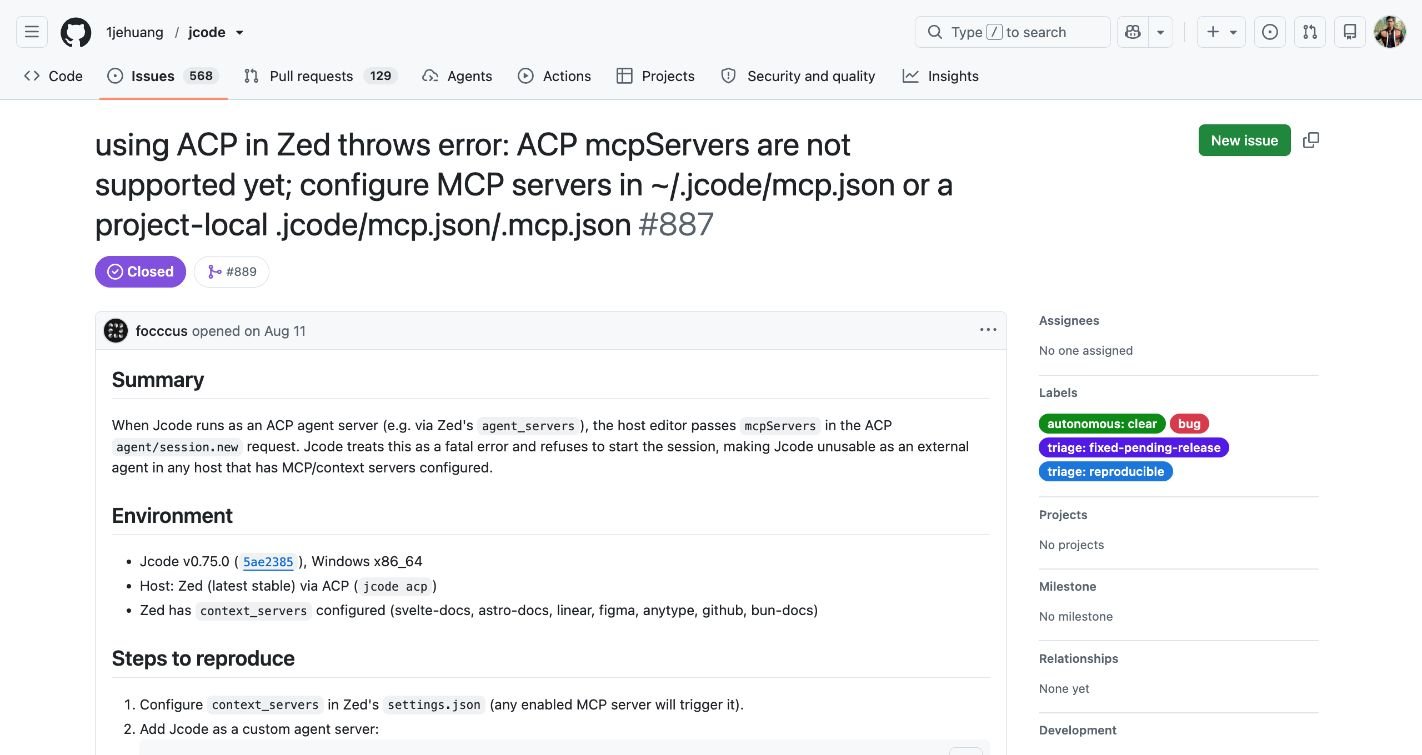
Zed refuses a session with “ACP mcpServers are not supported yet”
A Zed external-agent session fails when the editor passes its MCP servers.
Issue #887 describes a session-creation failure, not a failed model prompt. The current source accepts an array in the ACP mcpServers field, while noting that session-scoped MCP is not yet supported there. Accepting the session does not prove that every editor-supplied server is imported.
- Check the jcode binary that Zed actually launches. A newer command in your terminal does not help if the editor resolves an older executable.
- Update that installation and start a new external-agent session. Keep jcode’s file-based MCP configuration for servers you need; do not assume the editor list is automatically merged.
- If you must stay on the affected build, the reported workaround is to disable Zed’s context_servers entries. This also removes those servers from Zed’s own agent panel, so save the original settings and restore them when testing is finished.
Do not silently disable editor integrations for everyone sharing a project. Test the smallest change and preserve the working configuration.
Evidence: Upstream issue #887; linked change #889; current ACP validation.
Windows terminal output or typed input becomes corrupted
Visible escape fragments, overlapping prompts or fragmented input during a running session.
Issue #501 describes corruption while the TUI is already running. It is separate from a launch-time crash. The report says Git Bash behaved normally on the reporter’s machine, but that observation is not a universal fix or evidence that the underlying renderer bug is resolved.
- Preserve work, note the jcode version, terminal application and OS build, and capture the visible symptom. Redact private prompts and paths before sharing a screenshot.
- Try a fresh terminal session. If practical, compare another already installed terminal with the same jcode binary and a harmless prompt.
- If only one terminal reproduces the issue, report both environments. Avoid changing provider credentials or deleting sessions to troubleshoot a rendering symptom.
If the process crashes before it opens, record the launch error instead and consult the separate launch-crash report. Keeping these two symptoms separate makes a bug report much easier to reproduce.
Evidence: Upstream issue #501; Upstream issue #498.
Back to the error index ↑What we tested, and what we did not
Added 16 October 2026: I ran current v0.98.1 provider and MCP tests. Provider results include controlled local auth/routing checks and real local model recovery; MCP results include actual stdio tool calls and timeout recovery. These new checks have their own scope and do not change the dates or limits of the older checks below.
Added 15 October 2026: I reproduced a local Ollama missing-model 404 and verified response recovery with Jcode v0.91.0 and Ollama 0.35.0. See the separate before-and-after evidence. The older checks below retain their original scope.
The offline CLI checks ran on macOS with jcode v0.90.0-dev (unknown) in a temporary JCODE_HOME. Telemetry was disabled for those checks. No real provider credentials were entered and no paid model request was made. The current source was reviewed separately at commit af0dff7, whose package version is 0.95.0. That source snapshot is not the same binary as the local test installation.
- Passed: installed version command, rejection of public HTTP, acceptance after changing the demo URL to HTTPS, acceptance of localhost HTTP, protection against an accidental duplicate provider profile, and the expected error for missing OAuth state.
- Also checked: malformed JSON fails validation and the corrected JSON passes. This verifies syntax checking, not a real MCP server connection.
- Not reproduced here: Windows installer repair, Windows browser host repair, Windows rendering problems, Zed sessions, live OAuth completion, hosted provider answers and real MCP server recovery.
A documentation mismatch to watch for
The reviewed README still describes MCP as stdio-only, but the current protocol source includes HTTP/SSE transports and environment expansion. Check the source and release behavior for your installed version before deciding that a remote server is unsupported. A current-source feature is not proof that an older binary supports it.
Compare the README with the pinned protocol implementation.
Still stuck? Make the report reproducible.
A useful report lets another person distinguish installation, authentication, transport and UI failures without reading your whole session. Search the upstream issues for your exact message before opening a new report.
Jcode version and commit:
OS and architecture:
Terminal or editor and version:
Installation method:
Provider/model or MCP server (no secrets):
Exact command or action:
Expected result:
Actual error:
Smallest reproduction steps:
Workaround attempted and result:
Attach a cropped screenshot if it shows a UI problem, and paste the relevant error as text so it can be searched. Exclude API keys, callback URLs, authentication files, private repository content and unrelated conversation history.
Common troubleshooting questions
Should I update jcode before trying a workaround?
Record the current version first, then check whether the report matches it. Use your installation method to update. The README documents jcode update for supported installations, but development builds can intentionally refuse a downgrade when ancestry cannot be verified. Check the result instead of assuming an update command changed the binary.
Will reinstalling fix an authentication error?
Not necessarily. Reinstalling a launcher does not correct an expired OAuth attempt, a wrong provider key, a missing model or a provider outage. Start with the auth entry matching the actual error. If reinstalling is appropriate, follow the uninstall and reinstall guide and preserve data you need.
What if a provider profile already exists?
The local test confirmed that creating the same named profile again fails rather than replacing it silently. Use the existing profile or choose a distinct name. The documented --overwrite option deliberately replaces an existing profile; back up the configuration and verify its settings before using it.
Why will a Linux binary not start in Termux?
Check the runtime prerequisites before treating this as a provider problem. The current installation documentation requires glibc and patchelf before the installer prepares its Termux launcher. The documented prerequisite command is pkg install glibc patchelf. Follow the official installation instructions; this guide did not reproduce an Android installation.
Does an empty model list always mean the API key is wrong?
No. Check the chosen provider/profile, the exact model identifier, model access and the endpoint’s model catalog. Some self-hosted endpoints do not return a useful models list. Do not switch credentials blindly. Follow the provider guide or local model walkthrough for the setup you actually use.
Continue with the setup guide
Editorial review: 14 October 2026. Upstream statuses and supported behavior can change. This independent guide links its evidence so you can compare it with the build you run.